google reviews
How to Get More Google Reviews (Without Breaking the Rules)
By Daniel Reyes · · 11 min read
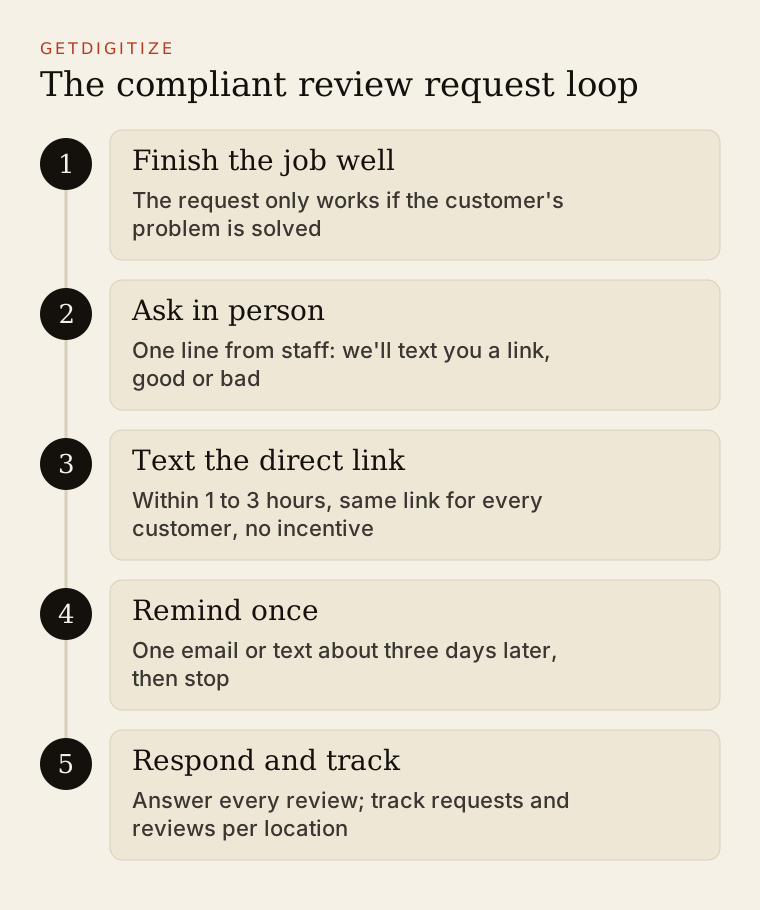
The way to get more Google reviews is to ask every customer, every time, at the moment they are happiest, with a link that opens the review form in one tap. For most local businesses that means a text message within a few hours of a finished job, backed by a short in-person ask from staff. No incentives, no filtering, no shortcuts.
Reviews matter more than most operators treat them. Google’s own local ranking guidance says “more reviews and positive ratings can help your business’s local ranking,” and reviews are also among the sources AI assistants read when someone asks which dentist, plumber, or salon to choose. A location with 40 recent, detailed reviews has more to work with than a location with 400 reviews from four years ago.
This guide is for the owner or marketing lead at a local business, especially operators with 3 to 15 locations. It covers timing, channels, scripts you can copy, the rules that get profiles penalized, and how to set goals per location.
Why do Google reviews matter for local rankings and AI answers?
Google reviews matter because they feed prominence, one of the three factors Google names for local ranking, and because they are the most detailed public record of what each location is like. Google groups local ranking into relevance, distance, and prominence, and it lists review count and ratings among the prominence signals.
Three things about reviews carry weight in practice:
- Volume. More reviews give Google and customers more evidence. A branch with 12 reviews next to a competitor with 300 loses the comparison before anyone reads a word.
- Recency. A steady flow shows the business is operating and consistent today. Customers notice when the latest review is from last year, and so do the systems summarizing reviews.
- Content. Reviews that mention the service (“replaced our water heater same day”), the location (“the Gilbert office”), or the staff member give search engines and AI answers specific facts to match against specific searches.
AI answers raise the stakes on content. When someone asks an assistant for “a pediatric dentist near Chandler that’s good with anxious kids,” the answer draws on reviews that actually say something like that. Our local business AI visibility guide explains how to check what assistants currently say about your locations.
What do Google and the FTC prohibit?
Google prohibits incentives for reviews of any kind, selective solicitation of positive reviews, pressuring customers on premises, and reviews from employees or anyone with a conflict of interest. The FTC separately bans fake reviews and several related practices under a federal rule. Google’s rules are stricter, so if you follow Google’s, you are generally clear of the FTC’s.
Here is what each says, side by side:
| Practice | Google’s policy | FTC rule |
|---|---|---|
| Fake reviews, including AI-written reviews by people who were not customers | Prohibited: contributions “should reflect a genuine experience” | Prohibited |
| Discount, gift card, or free service in exchange for any review | Prohibited, even if the review can be negative | Allowed only if not conditioned on sentiment and disclosed |
| Reward conditioned on a positive review | Prohibited | Prohibited |
| Asking only happy customers (review gating) | Prohibited: “selectively solicit positive reviews” | Not specifically in the rule, but “could violate the FTC Act” |
| Employees or owners reviewing their own business | Prohibited as a conflict of interest | Undisclosed insider reviews prohibited |
| Pressuring customers to review while on premises | Prohibited | Not addressed directly |
| Threats or false accusations to remove a negative review | Not allowed | Prohibited as review suppression |
The Google column comes from Google’s prohibited and restricted content policy, which bans offering “incentives, such as payment, discounts, free goods and/or services, in exchange for posting any review,” and bans efforts to “discourage or prohibit negative reviews, or selectively solicit positive reviews from customers.” It also says merchants should not “require or pressure users to leave ratings or write reviews while on the premises, nor should they request that specific content be included.”
The FTC column comes from the Consumer Reviews and Testimonials Rule, announced in August 2024. According to the FTC’s business guidance Q&A, it “went into effect on October 21, 2024,” and “authorizes courts to impose civil penalties for knowing violations.”
The practical takeaway: the FTC might tolerate a neutral, disclosed incentive, but Google does not. Since the review lives on Google, Google’s policy is the one that decides whether reviews get removed or the profile gets restricted. Our guide on ethics in digital brand management covers the broader disclosure principles.
What about review gating tools?
Review gating is a survey that asks “How was your visit?” and sends only 4 and 5 star answers to Google while routing unhappy customers to a private form. It is prohibited under Google’s policy. Many review software tools still offer a version of it, so check the settings. Sending every customer the same Google link is compliant. You can still offer a private feedback option alongside it, as long as everyone also gets the Google link.
When and how should you ask for a review?
Ask within a few hours of the moment the customer’s problem is solved, by the channel they already used with you, with a direct link. For home services that moment is when the technician leaves; for a dental office it is after checkout; for a salon it is when the client sees the result in the mirror and again that evening.
Which channel works best?
Text message usually works best for local service businesses because it is read quickly and the review link opens directly on the phone the customer will type on. Email works as a second touch, and in person works as the setup that makes the text feel expected.
| Channel | Best for | Timing | Notes |
|---|---|---|---|
| SMS | HVAC, plumbing, dental, medical, salons | 1 to 3 hours after job or visit | Get consent to text during booking; keep under 300 characters |
| Retail, larger-ticket services, patients who prefer email | Same day or next morning | Use as reminder 3 days later if no review | |
| In person | Every business with face-to-face contact | At checkout or job completion | Ask verbally; never hand them a device to review on the spot |
| QR code | Front desks, receipts, leave-behind cards, service invoices | Always visible | Scannable at home later; not a substitute for the text |
| Invoice or receipt | Home services, retail | With payment | Short line plus link or QR code |
How do you create a direct review link and QR code?
Google gives every verified profile a shareable review link. Google’s tips for getting more reviews recommend asking customers “to visit a Google link or scan a QR code.” In your Business Profile, choose “Ask for reviews” (or “Get more reviews”) to copy the link. Create one link per location, since each location has its own profile. For QR codes, generate the code from that same link and label it with the location name so staff do not mix up branches.
Test every link on a phone that is not logged in to your business account. It should open the star-rating form for the correct location.
Copy-paste templates: review request texts and staff scripts
Use these as starting points. Replace the bracketed fields, keep them short, and send the same message to every customer.
Text message, home services (HVAC, plumbing, electrical):
Hi [First name], this is [Tech name] from [Business]. Thanks for having us out today to [fix your AC]. If you have a minute, a Google review helps neighbors find us: [link]. Reply here if anything isn't right and we'll make it right.Text message, dental or medical office:
Hi [First name], thanks for visiting [Practice] in [City] today. We'd appreciate an honest Google review of your visit: [link]. Questions about your care? Call us at [phone].Keep medical and dental requests generic. Do not reference the procedure or condition in the text, and consult your compliance advisor on patient communication rules for your practice.
Text message, salon:
Hi [First name], thanks for coming in to see [Stylist] today. If you love it (or want anything tweaked), tell us. Reviews on Google help us a lot: [link]Follow-up email, 3 days later (one reminder only):
Subject: Quick favor from [Business]

Hi [First name],

Thanks again for choosing [Business] for [service] on [date]. If you have two minutes, an honest review on Google helps other people in [City] decide who to call: [link]

Thank you,
[Name], [Role]
Staff script at checkout or job completion (verbal):
“Thanks for choosing us today. We’ll text you a link to Google reviews in a bit. If you have a minute tonight, an honest review really helps us, good or bad.”
Notice what the templates avoid. No discount. No “5-star” language. No request to mention specific words. No asking them to do it right now at the counter. “Good or bad” in the staff script is deliberate: it makes the request clearly non-selective, which keeps you inside Google’s policy.
How many reviews should each location aim for?
Set goals per location, based on the local competition, rather than one brand-wide number. A dental group’s total review count means little if one office has 600 reviews and another has 15; the office with 15 is the one losing in its own Map Pack.
A simple way to set targets:
- For each location, search the main keyword (“dentist near me,” “AC repair”) from that neighborhood and note the review counts of the three businesses in the Map Pack.
- Set a 12-month target around the median of those three, and a monthly pace to reach it.
- Track weekly by location: requests sent, reviews received, average rating, and response time.
| Metric | Why it matters | Healthy signal |
|---|---|---|
| Requests sent per completed job | Shows whether staff are asking at all | Close to 100 percent |
| Reviews received per requests sent | Shows whether the message and timing work | Rising month over month |
| New reviews in last 30 days | Recency | Steady, not bursty |
| Owner response rate | Shows you are listening | Every review answered |
| Average rating by location | Service quality signal | Stable; investigate drops |
Watch for bursts. Fifty reviews in one week after months of nothing looks unnatural and usually means a campaign that was not sustained. A steady monthly pace from asking everyone is both more credible and more useful.
What about negative reviews?
Negative reviews are part of the deal, and a profile with only 5-star reviews can look less credible than one with a few thoughtful responses to complaints. Respond to every negative review within a couple of business days, calmly and specifically, and move the details offline. Never offer anything in exchange for removing or changing a review; Google’s policy prohibits that too. We cover wording and templates in how to respond to negative reviews.
How local operators, D2C brands, and founders should use reviews
Local operators. Reviews are your most important recurring task after answering the phone. Put the review request into the job-completion workflow in your CRM or scheduling software so it sends automatically, and make sure each location’s texts use that location’s link. Pair reviews with a complete profile; our Google Business Profile guide for multi-location businesses covers the setup.
D2C brands. Google reviews matter less than product reviews on your site and retailers, but the same rules apply: no gating and no sentiment-conditioned incentives under the FTC rule. If you seed products to creators, disclosure rules apply there as well.
Founders. For a B2B startup, the equivalent is review sites in your category and customer quotes. The principle is identical: ask everyone, make it easy, never script the sentiment. Our piece on testimonials in digital marketing covers how to collect and use them on your own site.
Reviews also connect to earned media. A local reporter checking whether your business is legitimate often looks at your Google rating before calling back, and strong, recent reviews make a regional story easier to land. That is part of why word of mouth and reviews belong in the same plan.
Your next step
This week, create a direct review link for each location, add the text template to your job-completion workflow, and brief staff on the one-line verbal script. Then check your review software for any gating setting and turn it off. If you want help running reviews, profiles, and regional press as one local program, see what we do for multi-location local businesses.
Frequently asked questions
Is it legal to ask customers for Google reviews?
Yes, asking customers for Google reviews is legal and Google encourages it. Google’s own help center recommends sharing a review link or QR code with customers. What is not allowed is offering incentives, asking only customers you expect to be happy, pressuring people on premises, or posting reviews from employees. Send every customer the same neutral request and you are within Google’s policy.
Can I offer a discount for leaving a Google review?
No, Google prohibits any incentive in exchange for a review, including discounts, gift cards, raffle entries, and free services, even if the customer may write a negative review. The FTC rule allows some neutral, disclosed incentives, but Google’s policy is stricter and governs reviews on Google. Offering incentives can lead to review removal and restrictions on your Business Profile.
What is review gating and why is it banned?
Review gating is screening customers with a satisfaction survey and sending only positive responders to Google while routing unhappy ones elsewhere. Google bans it because it prohibits selectively soliciting positive reviews. The FTC says it could also violate the FTC Act. You can offer a private feedback form, but every customer must receive the same Google review link.
How soon after a service should I ask for a review?
Ask within a few hours of completing the job or visit, while the experience is fresh. For home services, send a text within one to three hours of the technician leaving. For dental, medical, and salon visits, send it the same afternoon or evening. Send at most one reminder, about three days later, by email or text.
Can employees leave Google reviews for their own business?
No, employees and owners should not review their own business on Google. Google’s policy treats reviews from current or former employees, contractors, and others with a conflict of interest as prohibited content and removes them. Under the FTC rule, reviews from insiders that do not clearly disclose their connection to the business are also prohibited.