google business profile
Google Business Profile for Multiple Locations: A Setup Guide
By Daniel Reyes · · 13 min read
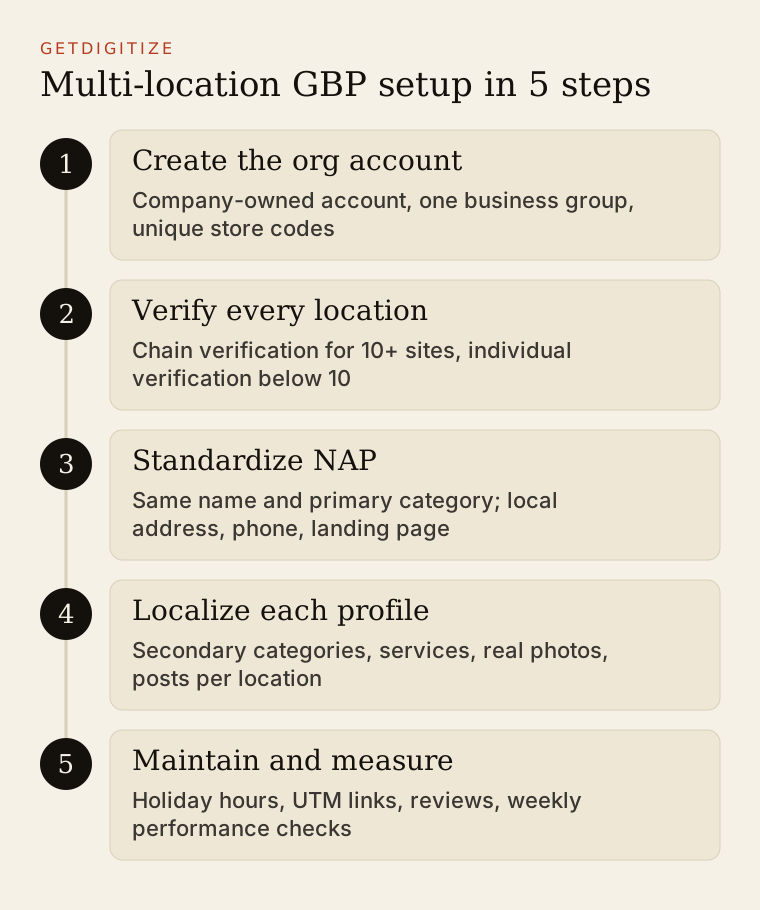
To manage Google Business Profile for multiple locations, create one profile per real-world storefront, verify 10 or more locations in bulk, organize them in business groups, and keep name, primary category, and brand details identical while making address, phone, hours, services, photos, and landing page specific to each site. Done well, every location can compete in its own Map Pack.
That last point is why this matters. A 9-location HVAC company does not compete in one market. It competes in nine, each with its own “near me” searches, its own competitors, and its own reviews. The Google Business Profile (GBP) for each branch is the single asset that decides whether that branch shows up in the Map Pack, and increasingly, whether Google’s AI Overviews and assistants like ChatGPT describe it correctly.
This guide is for the marketing lead at a dental group, HVAC company, salon chain, or retailer with 3 to 15 sites.
How does Google Business Profile work for multiple locations?
Google Business Profile treats each physical location as its own profile, and a multi-location brand manages them together from one account. Google’s guidelines for representing your business say to “create your Business Profile for your actual, real-world location,” which means one profile per storefront or office that serves customers in person, never one profile for the whole company.
Three structural pieces make this workable at scale:
- One organization account. Create a Google account owned by the company (not a single employee) and make it the primary owner of every profile. When a marketing coordinator leaves, the profiles stay with you.
- Business groups. Google’s help page on business groups describes them as “a more secure way to manage and share access to your Business Profiles with co-workers.” Anyone added to a group can see all current and future profiles in it.
- Store codes. Each location gets a unique store code (for example,
HVAC-PHX-03). Store codes are how Google matches rows in a bulk spreadsheet to live profiles, so choose a format you will not need to change.
For most operators with one brand, one business group is the right call. Google notes that splitting profiles across several groups has a cost: “Each group requires a separate spreadsheet import and you won’t be able to find all profiles in one dashboard.” Use multiple groups only when different brands or franchisees must be kept apart.
How do you verify multiple locations at once?
You verify 10 or more locations at once through bulk verification, also called chain verification. Google’s bulk verification page lists the eligibility rules:
| Requirement | What Google says | What it means for you |
|---|---|---|
| Minimum size | ”10 or more profiles from the same business” | Operators with 3 to 9 sites verify each location individually |
| Complete list | ”Your spreadsheet has all the profiles you manage” | Do not submit a partial list and add the rest later |
| No existing verified account | ”A verified account doesn’t already exist” | Clean up duplicate or legacy accounts before you apply |
| Business type | Service-area businesses are not eligible | A mobile groomer or a plumber with no storefront verifies per location |
| Account health | ”Your account has no errors” | Fix flagged addresses and missing fields first |
The process is two steps. First, upload your locations to the business group by spreadsheet (Google stresses that “uploading a spreadsheet doesn’t send a verification request”). Then, in Business Profile Manager, open the Verifications tab, choose “Chain,” and submit the form. Google reviews it and confirms by email.
If you have fewer than 10 locations, plan for individual verification. Google chooses the method per profile (video recording, phone, email, or live call are common), so budget time for a staff member at each site to complete it. Record the method and date in a shared sheet; you will want it if a profile is ever suspended.
What NAP rules apply to multi-location businesses?
Name, address, and phone (NAP) must be consistent within the brand and accurate for each site. The brand name stays identical everywhere; the address and phone number are unique per location. Inconsistent names are the most common mistake we see on multi-location accounts, usually because a branch manager added the neighborhood to the name.
Google’s guidelines are explicit: “All business locations within the same country must have the same name for all locations.” There are only two exceptions: genuinely different sub-brands (Google’s example is a Supercenter versus an Express format) and locations whose real-world signage uses a different name.
A clean NAP standard for a dental group looks like this:
| Field | Location A | Location B | Rule |
|---|---|---|---|
| Business name | Brightside Dental | Brightside Dental | Identical, no city or keywords added |
| Address | 1420 Main St, Suite 200, Mesa, AZ | 88 Camelback Rd, Phoenix, AZ | Exact street address, include suite |
| Phone | Local Mesa number | Local Phoenix number | Local line per site, not one central 800 number |
| Website | /locations/mesa/ | /locations/phoenix/ | Location page, not the homepage |
Put the same NAP, word for word, on each location page of your website, and mark it up with LocalBusiness schema. That match between your site, your GBP, and directories is what lets search engines and AI systems treat each branch as a distinct, trusted entity. Our guide to schema markup for AI citation covers the markup itself.
Virtual offices and coworking desks are not eligible unless the location has signage, staffed hours, and receives customers.
Primary vs secondary categories: how should you choose?
Your primary category is the single most important relevance signal on the profile, and Google requires chains to use the same one across locations that offer the same services. The guideline reads: “All locations of a business must share the one category that best represents the business.”
Choose the primary category by asking which one word a customer types most often to find you: “Dentist,” “HVAC contractor,” “Hair salon.” Then use secondary categories to describe what a specific location actually does. This is where per-location variation is allowed and useful:
- A dental group keeps “Dentist” as primary everywhere, but adds “Pediatric dentist” only to the two offices with a pediatric dentist on staff, and “Orthodontist” only where an orthodontist practices.
- An HVAC company keeps “HVAC contractor” as primary, adds “Air conditioning repair service” everywhere, and adds “Furnace repair service” only in the northern branches where they do heating work.
- A salon chain keeps “Hair salon” as primary and adds “Nail salon” only at locations with nail stations.
Never add a category a location cannot serve; it sends callers who leave annoyed, and annoyed customers leave reviews.
How do you set up services, photos, and landing pages per location?
Services, photos, and landing pages should be written for each location, because they are what make one branch relevant to the searches around it. Copying one template across 12 profiles wastes the only fields where you can show local differences.
Services. List services that the location performs, using the words customers use. Add a one-line description with a local detail where true (“Same-day AC repair across Mesa and Gilbert”). Keep pricing out unless it is accurate and maintained.
Photos. Each profile should show that location: the storefront from the street (so people can find the door), the interior, the team, and real work. A simple standard we recommend:
| Photo type | Minimum per location | Refresh cadence |
|---|---|---|
| Exterior, from the street and parking lot | 2 | Yearly or after signage changes |
| Interior and waiting area | 3 | Yearly |
| Team at that location | 1 to 2 | When staff changes |
| Work examples (before and after, finished installs, styled hair) | 4 or more | Monthly |
| Vehicles or equipment with branding | 1 to 2 | Yearly |
Skip stock images and shared brand graphics. A customer choosing between two branches wants to see the one they will visit.
Landing pages. Point each profile’s website link to that location’s page on your site, not the homepage. The page should carry the same NAP, hours, services offered at that site, a map, parking or access notes, and reviews from that location. If you have been thinking about broader location targeting, our overview of location-based marketing explains how these pages support paid and organic local campaigns.
What about Google posts and Q&A?
Google posts are short updates (offers, events, news) published on a profile, and they are worth doing per location when you have something local to say. A branch’s seasonal tune-up offer, a community event, or a new provider are better posts than a brand-wide announcement copied to every profile.
A practical cadence for a small team: one post per location every two weeks, drafted in a batch from a shared calendar. Give each post a location-specific UTM link (see below) so you can see which ones produce calls and visits.
The classic Q&A section has changed. In late 2025 Google began phasing out owner-answered Q&A on Maps in favor of AI-generated answers built from your profile, website, and reviews. So the facts on each profile and location page now answer customer questions directly: if the Phoenix page says “Open Saturdays” and the Phoenix profile does not, expect a wrong answer. Add a short FAQ block to each location page (parking, insurance accepted, emergency service, languages spoken).
How do you manage hours and holiday updates across locations?
Set regular hours per location, then set special hours for every holiday before it arrives, even when a location is open normal hours. Google’s special hours help page advises: “It’s a good idea to confirm your hours for official holidays, even if they’re the same as your regular hours.” A confirmed holiday stops Google from showing a “hours might differ” warning.
For 3 or more locations, use the bulk spreadsheet. Google’s instructions let you upload “only the store code and special hours columns” to update existing profiles, so one file can set Thanksgiving, Christmas Eve, and New Year’s hours for every branch in a few minutes.
A holiday hours checklist for the marketing lead:
- In early November and early spring, collect each branch manager’s holiday schedule in one sheet.
- Upload special hours for the next 90 days by store code.
- Match the location pages on your site and your phone system’s after-hours message.
- The morning of each holiday, spot-check two profiles on a phone in Google Maps.
- For weather closures or emergencies, update special hours for the affected branches the same day, then post a short update.
How do you track calls and visits with UTM parameters?
Add UTM parameters to each profile’s website link so you can separate GBP traffic by location in Google Analytics. Google’s URL builder guidance says you “should always use utm_source, utm_medium, and utm_campaign.” Without them, GBP clicks often land in analytics as generic organic or direct traffic.
Copy this template and change only the location slug:
https://www.example.com/locations/mesa/?utm_source=google&utm_medium=organic&utm_campaign=gbp&utm_content=mesaUse utm_content for the location so you can compare branches in one report. For Google posts, keep the same source and medium but change the campaign (utm_campaign=gbp-post-fall-tuneup). For calls, use the local number on each profile and read the call count in the profile’s performance report; if you use call tracking, keep the local number as the primary and consult your call tracking provider’s documentation before adding a tracking number, because a mismatched primary phone weakens NAP consistency.
What causes suspensions on multi-location profiles?
Suspensions on multi-location accounts usually come from guideline violations that look harmless at the branch level. Google’s guidelines state that it “reserves the right to suspend access to Business Profiles on Google or other Google Services” for violations. The common triggers:
| Risk | Example | Fix |
|---|---|---|
| Keywords in the name | ”Brightside Dental Mesa Best Cosmetic Dentist” | Use the exact brand name only |
| Ineligible address | A coworking desk or PO box listed as a branch | Remove it or convert to a real, staffed location |
| Duplicate profiles | An old profile created by a former manager | Claim it and request removal or merge |
| Mass edits after verification | Changing names, addresses, and categories on 12 profiles in one day | Stage edits and document the reason |
| Review policy violations | Offering a discount for reviews at the front desk | Follow the rules in our Google reviews guide |
Keep an ownership log (owner, verification method and date, store code) and photos of each location’s signage. That evidence is what gets a suspended profile reinstated.
How does Google Business Profile feed the Map Pack and AI Overviews?
Google Business Profile feeds the Map Pack through three factors Google names in its local ranking help page: relevance, distance, and prominence. Google says “businesses with complete and accurate info are more likely to show up in local search results” and that “more reviews and positive ratings can help your business’s local ranking.” You cannot change distance. You can change relevance (categories, services, complete fields) and prominence (reviews, links, press mentions).
The same profile data now travels further. When someone asks an AI assistant “best emergency plumber in Mesa,” the answer draws on the facts it can verify: the business listing, the location page, reviews, and mentions in local news and directories. A branch with thin, inconsistent data is easy for an AI answer to skip or describe wrongly. The same logic applies to spoken queries; our guide to voice search optimization covers how assistants read local data. Our local business AI visibility guide walks through how to check what assistants currently say about each of your locations.
Prominence is also where earned media shows up. A Business Journal story about your new branch, or a local TV segment on heat-wave AC safety, creates the kind of third-party mention that supports both rankings and AI citations. Reviews do the same at the location level, which is why how you respond to negative reviews matters for each branch, not just for the brand.
What should local operators do first?
If you run 3 to 15 locations and your profiles have grown without a standard, start with an audit rather than new content. In one afternoon:
- Export every profile from Business Profile Manager and check name, primary category, address, phone, website link, and hours against a single standard.
- Search for duplicate or unclaimed profiles for each address.
- Rewrite the website link on every profile with the UTM template above.
- Set special hours for the next three holidays.
- List which locations have fewer than 10 real photos and schedule a shoot.
After that, the weekly routine is small: respond to reviews, post biweekly per location, and check calls and direction requests by branch. If you would rather hand the full local program (profiles, reviews, regional press, and AI visibility) to a team, see how our Local Operator Package works.
Frequently asked questions
Can one Google Business Profile cover multiple locations?
No, each physical location needs its own Google Business Profile. Google’s guidelines tie a profile to an actual, real-world location, so a single profile cannot represent several storefronts. You manage the separate profiles together from one organization account and business group, which lets you edit hours, photos, and posts for all locations while each branch still ranks in its own local results.
How many locations do you need for bulk verification?
You need 10 or more locations from the same business to qualify for Google’s bulk verification. Your spreadsheet must include every profile you manage, the account cannot already be verified, and the business cannot be a service-area business. Operators with fewer than 10 sites verify each location individually, usually by video, phone, or email, depending on the method Google offers for that profile.
Should each location use a different primary category?
No, locations offering the same services should share one primary category. Google requires all locations of a business to share the category that best represents it, such as “Dentist” or “HVAC contractor.” Variation belongs in secondary categories, where you add services only a specific location offers, like “Pediatric dentist” at the offices with a pediatric specialist on staff.
Can I add the city name to each location’s business name?
No, adding a city or keyword to the business name violates Google’s guidelines unless your real-world signage uses that name. All locations in the same country must use the same name. Put location details in the address, the landing page URL, the services, and the photos instead. Keyword-stuffed names are a common cause of suspensions on multi-location accounts.
Does Google Business Profile affect AI Overviews?
Yes, indirectly. AI Overviews and assistants build local answers from information they can verify, including business listings, location pages, reviews, and third-party mentions. A complete, consistent profile gives them accurate facts about hours, services, and location, while missing or conflicting details make a branch easier to skip or misdescribe. Keep each profile and its location page in sync.